







Timextender MCP Server
Securely Connect Your Data to the AI Tools and Agents Your Teams Already Use
Give every AI tool and agent the same governed definitions your analysts trust. Answers use consistent metrics, access stays under your control, and every query is logged.

Trusted by Teams Where Accuracy Matters




Fast AI Outputs Aren't Useful If They Can't Be Trusted
AI tools can generate answers fast, but without governed definitions they have to guess what your data means. That guesswork is where inconsistent numbers come from, and it's where teams stop trusting AI.
Ask the same question in three systems and you get three different answers:
| CRM | Data Warehouse | Finance Ledger |
| $4.2M | $3.8M | $4.5M |
| Q1 Revenue | Q1 Revenue | Q1 Revenue |
Get Fast AI Outputs You Can Trust
The Timextender MCP Server closes that gap. It routes every AI query through the governed semantic layer your analysts already use, so answers start from approved definitions.
Connect
Link any MCP-compatible AI client or agent, including Xpilot Analytics, to your Timextender semantic models.
Query
AI turns a plain-language question into a request in your business terms, and the MCP Server compiles it into read-only SQL.
Trust
Answers use the approved definitions in your semantic model, and you can check the SQL behind them.
How It Works
The MCP Server sits between your data and your AI tools. The AI tool turns a plain-language question into a request in your business terms, and the MCP Server compiles it into a read-only query against your approved definitions, so every output starts from those definitions and can be traced back to them.
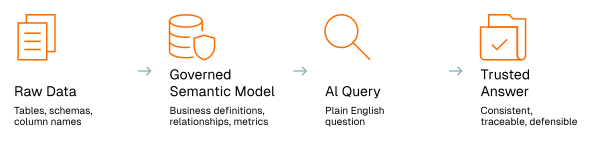
Run the MCP Server in your own environment, on a virtual machine or an on-premises server that can reach your data warehouse. It runs only read queries, through a database account you limit to what your models need. With a cloud AI client, the MCP Server sends it only semantic metadata and the results of the queries it runs, so the business gets its answers while IT controls what leaves the network. With a local model and no cloud registration, nothing leaves your network.
For business users, Xpilot Analytics is built on the MCP Server and answers from the same definitions, with nothing for them to set up.
What the Timextender MCP Server Delivers
The difference is what the AI queries: your governed semantic model, with the metrics tool resolving joins and measures from the model, and every query checked as read-only and logged.
Consistent Answers Across Every Team
Sales, Finance, and Analytics work from the same definitions, because every AI query runs against the same governed semantic model.
AI Agents That Produce Reliable Outputs
Agents query governed definitions and approved business logic, so outputs are grounded in what your organization already trusts.
Self-Service That Scales
Business teams ask questions in plain language and get answers backed by the same governed data your dashboards run on.
Governance That Doesn't Compromise
Read-only enforcement, audit logging, and API keys limited to specific semantic models keep AI queries inside your existing governance boundaries.
Traceable Answers
The audit log records every query and the model it ran against, and the metrics tool returns the SQL it generated. When someone asks where a number came from, you can show it.
Secure by Design
AI clients reach your data only through the MCP Server's governed query tools, so they can't see the raw database schema, can't run anything except read queries, and can't reach tables your semantic model doesn't expose.
Capabilities
Governed Semantic Intelligence
Connect AI tools and agents to the Deliver layer where your definitions, relationships, and metrics live. Queries run against the semantic model, which exposes only the views, columns, and measures your team has published.
Natural Language to Governed SQL
Turn plain-language questions into SQL grounded in validated business terms, entities, and metrics. Answers stay consistent with the definitions used in reporting.
Read-Only Query Validation and Audit Logging
Every query is validated as read-only before it runs. The server's audit log records each query, the model it ran against, and, for API-key connections, the name of the key that sent it.
Dual-Mode Connectivity
Use Stdio mode to connect Claude Desktop on the same machine. Use HTTP mode for shared and enterprise deployments, with API keys limited to specific semantic models or OAuth sign-in through your own identity provider.
Correct Answers Across Multiple Tables
The MCP Server's metrics tool resolves joins and measure grain from your semantic model, so questions spanning several tables don't come back with inflated totals. When a request is genuinely ambiguous, it declines rather than guessing, and when it does answer, it returns the SQL it generated.
Sign In With Your Own Identity Provider
Put the MCP Server behind OAuth with Microsoft Entra ID or Auth0, so Claude and ChatGPT users sign in with the accounts your directory already manages. API keys keep working alongside OAuth for other tools.
Built for the Teams Responsible for Trusted AI

Data and Analytics Leaders
You need AI outputs your organization can stand behind. The Timextender MCP Server grounds AI answers in the approved definitions in your semantic model, so they match your reports and decisions move forward without reconciliation cycles.
Learn More →
Data Platform and Engineering Teams
You're responsible for making AI access predictable and governable. The MCP Server gives you a controlled path for AI tools and agents through governed semantic models, with scoped access, read-only enforcement, and audit logging.
Learn More →
Consultancies
You need a repeatable way to deliver AI experiences aligned with each customer's governed semantic layer. The Timextender MCP Server lets you build consistent solutions without recreating metric definitions for every AI tool or project. You can follow the same pattern on every rollout: start with one domain, make sure the common questions come back correct, and then expand.
Learn More →
Frequently Asked Questions
-
What is the Timextender MCP Server?
The Timextender MCP Server is a Model Context Protocol implementation that connects AI clients and agents directly to your governed semantic models. Instead of pointing AI at raw database schemas, it routes queries through the approved business definitions, relationships, and metrics your analysts already rely on for dashboards, reporting, and planning.
-
What AI tools can connect to the MCP Server?
Any MCP-compatible client can connect. Claude and ChatGPT, including their desktop apps, connect through OAuth. Claude Desktop can also connect directly on the same machine in Stdio mode, and Microsoft Copilot Studio agents, LM Studio, Cursor, and custom agents connect over HTTP with an API key. Xpilot Analytics connects through the Timextender Data Platform.
-
What data does the MCP Server send outside our environment?
That depends on how you set it up. When a cloud AI client such as Claude asks a question, that AI vendor receives what the user typed along with the semantic metadata and query results it requested. If you register the server with the Timextender Data Platform so Xpilot Analytics can use it, an idle connection sends only a keep-alive, and a question in flight sends the query text and its results through the relay to the platform, which is hosted in the EU. If the MCP Server runs inside your own environment with a local model such as LM Studio and no cloud registration, nothing leaves your network, and all processing stays on your own hardware.
-
Should we use Xpilot Analytics or connect our own AI tools?
For business users, start with Xpilot Analytics. It's part of the Timextender Data Platform, there's nothing for them to configure, every answer shows the SQL behind it, and the answers worth keeping can be pinned, verified, and re-run. Admins choose which workspaces can query each MCP Server, the MCP Server connects out to the platform, and Xpilot Analytics data is processed on Microsoft Azure in the EU and never used to train AI models. If your technical teams also need to connect AI clients such as Claude or ChatGPT, or their own agents, the MCP Server supports that from the same governed semantic model.
-
How does the MCP Server relate to Timextender Data Integration?
Timextender Data Integration builds the governed semantic model and publishes it through a Deliver endpoint. The MCP Server, which you can install in your own environment, serves that model to AI tools and agents. You need both: Data Integration prepares and governs the data, and the MCP Server makes that governed layer accessible to AI.
-
What authentication and access controls are available?
The MCP Server supports API keys and OAuth 2.1. API keys suit tools like LM Studio, Cursor, and custom agents, and each key can be limited to specific semantic models, with its name recorded in the audit log. OAuth sign-in through Microsoft Entra ID or Auth0 lets Claude and ChatGPT users authenticate with their own accounts, and your identity provider controls who can sign in. Every query runs in read-only mode with audit logging.
-
What is the difference between Stdio mode and HTTP mode?
Stdio mode connects Claude Desktop to an MCP Server on the same Windows machine, with no API key needed. HTTP mode is the production transport: one URL serves every registered model to remote AI tools and agents, which sign in with an API key or OAuth. In both modes, every query is recorded in the audit log.
-
Can the MCP Server be deployed on-premises?
Yes, the MCP Server is a Windows service you can deploy in your own environment, on a virtual machine or an on-premises server that can reach your data warehouse and the semantic model file that Timextender Data Integration deploys. Until you register it, it runs in local-only mode and sends nothing to Timextender's cloud. Registering it with the Timextender Data Platform lets Xpilot Analytics reach it through an outbound-only connection, so no inbound firewall ports need to be opened, and you can pause or disconnect that connection at any time. AI clients that sign in with OAuth, such as Claude and ChatGPT, connect to the server directly, so for them it needs a public HTTPS address.
-
Which data warehouses does the MCP Server support?
The MCP Server supports Azure SQL Database, Snowflake, and Microsoft Fabric.
-
How do I get access?
The Timextender MCP Server is available now. Once your Timextender Data Platform is up to date, download the latest version of the MCP Server from the platform's Downloads page and run the installer. If your platform hasn't been updated yet, contact support@timextender.com. If you aren't a Timextender customer yet, you can book a demo.